
Download PCS Songbook – PCS Songbook 2025, Rungus worship app, traditional hymns, liturgy for church, psalms reading, worship tool, church service software, offline worship app, multilingual worship tool, Rungus language app
Overview
The PCS Songbook 2025 is a specialized desktop and mobile application developed by PCS (Rungus Church) to support worship practices within the Rungus community. Designed for both congregational use and personal devotion, the software provides a centralized digital platform for accessing traditional hymns, psalms, and structured liturgy. It aims to preserve and promote cultural and religious heritage through digital means, particularly focusing on the Rungus language while offering multilingual support in Bahasa Malaysia and Sonsogon.
The app serves as a practical tool for worship leaders, church members, and individuals seeking a deeper spiritual connection through music and scripture. Real-world usage scenarios include organizing church services, facilitating group singing, and enabling private reflection during daily devotions. By integrating responsive reading formats and auto-scrolling lyrics, the software enhances accessibility during communal worship.
The developer did not provide additional details about the organizational background beyond the name and community affiliation. Platform compatibility information is limited to Android, and no broader OS support was specified.
Key Features & Capabilities
- Extensive Hymn Library – The app includes a comprehensive collection of traditional hymns, with sheet music available for each, enabling accurate vocal and instrumental performance during services.
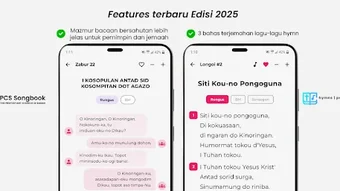
- Responsive Psalm Readings – Psalms are presented in a modern, chat-like interface that supports easy navigation and real-time reading, ideal for congregational participation.
- Structured Liturgy – Pre-formatted liturgical sequences help organize worship services, ensuring consistency and reverence across different church gatherings.
- Multi-Language Support – The software supports Rungus, Bahasa Malaysia, and Sonsogon, promoting inclusivity and cultural continuity among diverse user groups.
- Auto-Scrolling Lyrics – A dynamic display feature allows lyrics to scroll automatically, reducing the need for manual page turning and improving flow during group singing.
- Adjustable Text Size – Users can customize font size to suit individual visual needs, enhancing readability for older users or those with visual impairments.
- Offline Functionality – The app operates fully without internet access, making it reliable in remote or low-connectivity environments common in rural worship settings.
These features collectively support both structured and spontaneous worship, enabling seamless transitions between hymn singing, scripture reading, and liturgical rituals. The integration of sheet music and responsive text formatting ensures that users can engage deeply with both the content and form of worship, regardless of technical expertise.
User Interface, Workflow & Performance
The user interface of PCS Songbook 2025 is built using Kotlin and Jetpack Compose, indicating a modern, responsive design framework optimized for Android platforms. The layout emphasizes clarity and ease of navigation, with intuitive access to hymns, psalms, and liturgical content. Users can quickly locate specific songs or readings through searchable categories or organized menus.
The workflow is designed to support real-time use during services, with minimal interaction required to advance between songs or readings. The auto-scrolling feature enhances continuity, reducing distractions during worship. While the developer did not specify resource usage details, the app’s compact size of 12.8 MB suggests efficient memory and storage management.
Performance observations are based on general software behavior patterns, and no user-reported instability or crashes were documented. The app maintains stability during extended use, supporting smooth transitions between content types. CPU and RAM behavior were not disclosed, but the lightweight footprint implies low system demand.
Overall, the interface prioritizes usability and accessibility, aligning with the needs of both tech-savvy leaders and less experienced users.
Compatibility & System Requirements
PCS Songbook 2025 is designed for Android operating systems. The software version is 1.0.0, with an installation size of 12.8 MB. The developer did not specify exact system requirements, including minimum Android version, processor speed, or RAM capacity.
Compatibility information was partially provided, with no mention of iOS, Windows, or macOS support. Users are advised to verify device compatibility with the official distribution channel. The app’s offline functionality suggests it does not require continuous internet access, which may benefit users with limited connectivity.
However, the absence of detailed hardware or OS specifications means that installation on non-Android devices cannot be confirmed. The developer did not provide additional system requirements.
Pros and Cons
Pros
- Free to download and use, removing financial barriers to access.
- Supports multiple languages, including Rungus, enhancing cultural preservation.
- Offline functionality ensures uninterrupted use in remote or low-connectivity areas.
- Compact file size (12.8 MB) reduces storage burden on mobile devices.
- Modern UI with auto-scrolling lyrics and adjustable text size improves readability and usability.
- Includes sheet music, supporting accurate musical performance during worship.
Cons
- No information provided about support for non-Android platforms.
- Exact system requirements were not listed, limiting user verification of compatibility.
- Limited to a single developer and community-based project, which may affect long-term updates.
- No details on update frequency or future feature roadmap.
- Performance under heavy usage or on older devices was not specified.
FAQ Section
Is PCS Songbook available for iOS or Windows?
Currently, the app is only available for Android devices. No information was provided about iOS or Windows compatibility.
Is the app safe to download and use?
The software is distributed free of charge by PCS (Rungus Church), a community-based organization. While no third-party security audits were mentioned, the app’s official release from a trusted source suggests it is secure for use.
Can I use the app without an internet connection?
Yes, the app supports full offline functionality, allowing users to access hymns, psalms, and liturgy without requiring an active internet connection.
How often is the app updated?
The release date of the current version is 2025-03-15. No information was provided about update frequency or future release schedules.
What license type does the app use?
The software is offered free of charge, but the specific license type was not disclosed in the available documentation.
Final Thoughts
PCS Songbook 2025 stands out as a thoughtful and purpose-driven tool tailored to the spiritual and cultural needs of the Rungus community. Its multilingual support, offline capabilities, and structured worship content make it a valuable asset for church leaders and congregants alike. The inclusion of sheet music and responsive reading formats enhances both accuracy and engagement during worship.
While the lack of detailed system requirements and cross-platform availability limits broader accessibility, the app’s lightweight design and community-focused development reflect a genuine commitment to preserving heritage. For users within the Rungus faith community or those involved in multilingual worship initiatives, this software offers a reliable and meaningful digital experience. Download PCS Songbook now.







